Why are my drums playing when I don't hit them?
Sensors are very sensitive, which is what lets them hear ghost notes and the difference between the center and the edge of a head. The flip side is that they can also hear things you didn't mean them to. Misfires usually come in one of three kinds:
| What you hear | What's happening |
|---|---|
| A drum plays when you hit a different drum or cymbal | Cross-talk: the vibration travels through the stands, the shell, or the air to another drum's sensor. The kick shaking a floor tom, or a crash ringing next to a rack tom, are the classic cases. |
| One hit plays twice | Double triggering: a loose or ringy head keeps moving after the stroke, and the sensor hears a second hit. |
| A hit plays the wrong zone, like a rim sound from a center hit | Zone misfire: the training for that drum doesn't match how you're playing it now. |
Find the culprit
Hit one drum or cymbal at a time, at the volume you normally play it, and watch the rest of your kit:
- In the Play view, a small red mark flashes on the kit graphic where each hit landed, on the drum and zone it played.
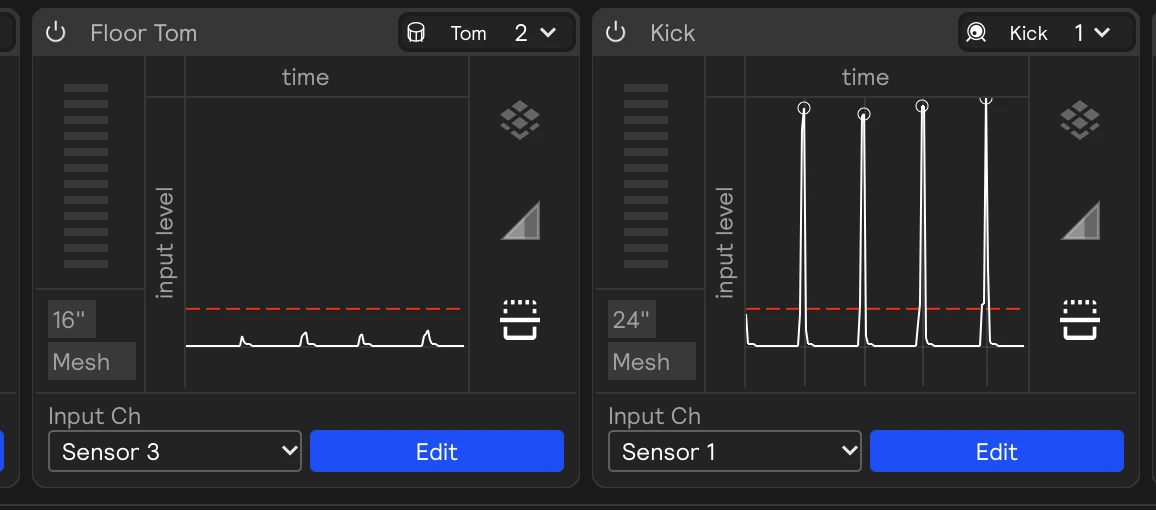
- In the hardware inputs panel, switch each sensor card to its Threshold view. A hit gets a dot on its peak when it's loud enough to play.
When a drum lights up without being hit, note which drum or cymbal caused it and how loud the stray hits are compared to your real ones. That decides which fix to reach for.
Fixing cross-talk
1. Raise the threshold, a little
Stray hits are usually much quieter than real ones. Click Edit on the sensor that's misfiring, and drag its Threshold line up until the stray hits stop getting dots, but your softest real strokes still do.
The threshold applies to everything that drum plays, in every set, so go gently. If you play ghost notes on the snare, you'll want its threshold lower than your toms'. See Use Thresholding.
2. Teach the sensor what to ignore
If the stray hits are as loud as your soft strokes, use the Void zone instead: open the drum's training window, switch to Manual Training, select Void, and hit the drum or cymbal that's causing the cross-talk. The sensor learns to ignore that sound.
A little goes a long way. A handful of Void hits is usually enough, and too many makes the drum less sensitive overall. See Void.
3. Protect the sounds that matter most
Some sounds should never fire by accident, like a chord progression or a set change. Rather than raising the threshold for the whole drum, raise it just for that module in its Velocity I/O panel, or raise the threshold on the assignment. See Velocity-thresholded chord sequences.
Also check that your velocity curves aren't extreme. A curve that turns quiet hits into loud ones makes faint cross-talk sound like a full hit.
4. Check the physical setup
- Make sure each sensor is tight on its hoop and its cable is pressed into the clip, so neither can rattle.
- Move a cymbal a little further from the drum beneath it.
- A rack tom mounted on the kick hears every kick stroke. A separate stand helps a lot.
- Sympathetic vibration from a bass amp or loud stage monitors can register as quiet hits. A bit of distance from the amp usually fixes it.
Fixing double triggers
- Click Edit on the sensor and lower Sensitivity a little at a time, until one stroke plays once. Lower sensitivity also means fast, soft notes like buzz rolls are less likely to register, so stop as soon as the doubles go away.
- Tune or dampen a very loose or ringy head.
- Check that the sensor is tight and isn't moving when you hit.
Fixing wrong zones
- Retrain the drum. Training is a snapshot of how the drum sounded at the time. Retrain after changing heads, retuning, moving the sensor, or replacing the pickup element.
- Train only the zones you use. Every extra zone is one more thing a hit can be mistaken for. If you never play cross-stick or shell, leave them untrained. Level 1 alone is enough for most playing.
- Train the way you play. Use the sticks and the dynamics you'll actually play with, and include soft and loud hits in each zone.
See Drum Training.
- On a Drum Trigger input, use Threshold and Sensitivity the same way. If head and rim are mixed up on a dual-zone trigger, adjust Zone split.
- On an eKit input, cross-talk is handled by your drum module. Check your kit's own crosstalk settings first, then the eKit card's Velocity view.
Still misfiring?
Send us a Diagnostic Report from Help → Generate Diagnostic Report, and include a recording of you playing the drums that misfire, plus the drum or cymbal that sets them off. That shows the support team exactly what each sensor hears.