Hardware Remap
Hardware inputs and outputs remember the exact channel on the exact audio interface they were set up on. When you switch to another interface, replace a Portal, or open a hardware inputs file from another computer, those channels aren't there anymore. Instead of leaving every input and output silent until you pick each channel again, Sensory Percussion offers to move them all for you, to the same channel numbers on the interface you have now.
Nothing moves until you choose to. Each remap is a single step you can undo.
The remap bar
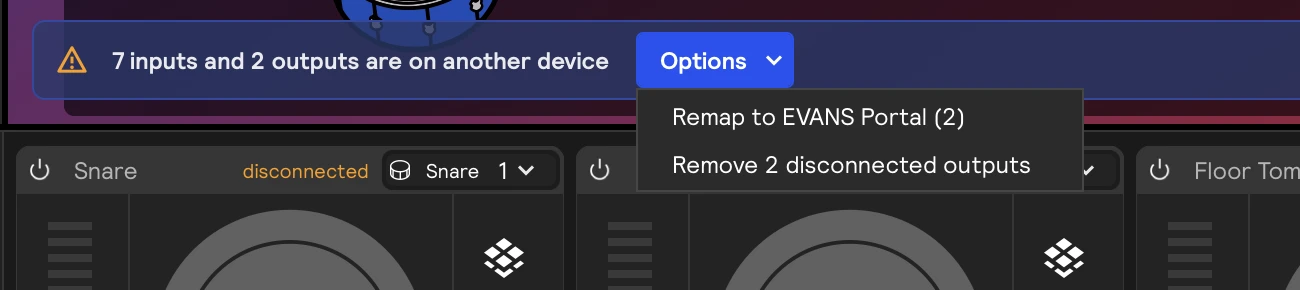
When some of your inputs or outputs aren't on the current interface, a bar appears above the footer saying so, with an Options menu on its right.

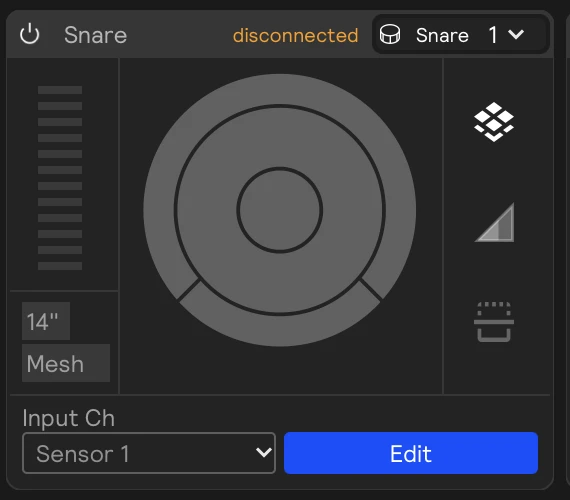
Each affected input or output card is marked disconnected:
The Options menu holds what you can do about it:
| Item | What it does |
|---|---|
| Remap to device | Moves every disconnected input and output to the same channel number on the current interface. Inputs follow the input device, outputs follow the output device, and sensor expansion inputs follow the expansion Portal. |
| Remap to device anyway | The same, offered when the bar thinks you'd rather reconnect the original interface. See below. |
| Remove N disconnected outputs | Deletes the outputs that aren't on the current interface, for cleaning up outputs from interfaces you no longer use. |
The Options button is blue when a remap is the likely next step, and plain otherwise.
After a remap, the bar turns into a one-line summary with an Undo button. If anything else is still on offer, like removing disconnected outputs, it stays in Options.

- If a channel the remap needs is switched off in Settings → Audio, the remap switches it on, and the summary says how many it switched on. Undo restores the old channels but leaves those channels on.
- An input or output that can't move, because the new interface has no channel with that number, stays as it is. It's counted in the summary and stays marked disconnected. Switching back to its own interface brings it back untouched.
- When nothing that's disconnected can move to the current interface, the bar just says so and offers no remap.
About 15 seconds after it appears, the bar folds down to a warning icon at the left. Click the icon to open it again. It also reopens on its own whenever its message changes. Close it with the × on its right, and it stays hidden until its message changes.
When you change interface yourself
The bar appears when you pick a new input or output device in Settings → Audio, connect a Portal, choose a sensor expansion, or go through the guided setup. Choose Remap to device from Options to move everything over.
When you open a file from another computer
Loading a hardware inputs or outputs file (File → Hardware Inputs → Load…) never rewrites anything by itself. Instead, the bar tells you what it found:
- N inputs need remapping to device (This file was made on another computer.): the file was made on the same kind of interface you have open. Choose Remap to device from Options to bind everything to the same channel numbers.
- N inputs were made for device (It is not connected.): the file was made on a different kind of interface. Plug that interface in and pick it, or choose Remap to device anyway to use what's open now.

When the environment's interface isn't connected
If you load an environment, or launch into one, while its interface is unplugged, its inputs and outputs show as disconnected but the bar doesn't suggest a remap. You most likely want to plug that interface back in, not rebind everything to whatever happens to be open. The bar names the interface the environment expects:

Connect and pick that interface, and the bar goes away on its own. If you really do want to move everything, Options still offers Remap to device anyway, along with removing disconnected outputs.
Loading an environment, reconnecting an interface, renaming a Portal, and picking a device never remap anything on their own. Only Options does.
New output devices
When you switch to an output device that none of your outputs can use, even after a remap, Sensory Percussion creates one output for each stereo pair on it. They're created when you close Settings, so you can switch the device's channels on first. If no channel is on yet, it tries again the next time you close Settings.