MIDI Outputs
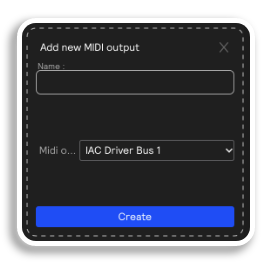
To send MIDI signal out of Sensory Percussion, you'll want to choose a MIDI hardware output. Once you do, you'll be prompted to name the output and choose the MIDI output channel you want to send it to. Both of these can be changed later.
MIDI hardware outputs allow you to send different types of MIDI messages out of Sensory Percussion and into other programs that accept MIDI. The possibilities are pretty endless with MIDI; use it to control visuals from the drums, play back music you've created in other software, or control a host of other MIDI-mappable parameters across a variety of different programs from behind your drum set!
How a MIDI output gets its messages
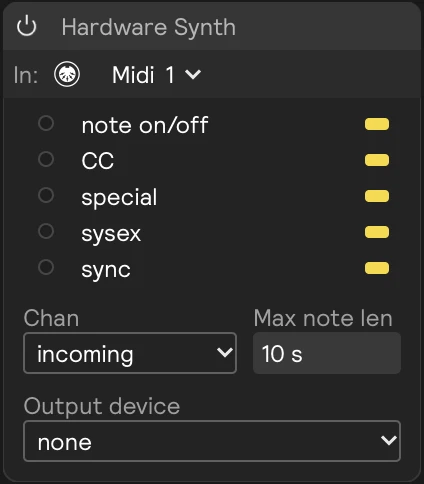
A MIDI hardware output sends whatever arrives on one MIDI output badge to a real or virtual MIDI device. Modules send to a badge: a MIDI Router, a MIDI notes generator, or a MIDI Kit. The session's Clock out sends its clock to one too.
| Control | What it does |
|---|---|
| In | The MIDI output badge this output listens to, like Midi 1. Set a module's output to the same badge to send it here. |
| Output device | The MIDI device the messages go to. A device has to be turned on in Settings → MIDI Devices first. |
| Chan | The channel messages go out on. incoming keeps the channel they arrived on. |
| Max note len | Ends any note that's held longer than this. |
Message filters
The card's activity panel has one row for each kind of MIDI message. The switch at the end of a row decides whether that kind of message is sent to the device, and the light flashes only for messages that are sent.
| Row | What the switch sends |
|---|---|
| note on/off | Notes. Turning it off also ends any notes that are still sounding, but stopping the session still reaches the device. |
| CC | Control change messages. |
| special | Pitch wheel, polyphonic aftertouch, and channel pressure. |
| sysex | SysEx messages. |
| sync | MIDI clock, and Start, Stop, and Continue. |
Every row starts switched on, sync included, so the session's clock reaches the device unless you switch sync off here.