Stereo Delay
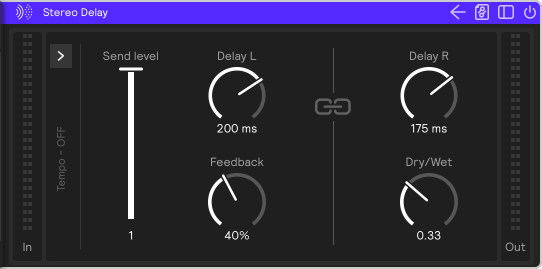
A delay with separate left and right delay times. Set the times in milliseconds, or switch to Tempo mode to sync the repeats to the session tempo as note values. Click the chain icon (Link) to switch between stereo and mono.
Parameters
Send Level
Reduces the gain of the audio input to the effect. Unlike adjusting Dry / Wet, modulating send level preserves any audio tails.
Delay L / Delay R
The left and right delay times, from 1 to 2,000 ms. In Tempo mode these are replaced by note values; see Tempo mode.
Link
Makes the right channel follow the left channel's settings, for a mono delay. While Link is on, the right channel's controls show the left channel's values, greyed out.
Feedback
How much of each repeat is fed back into the delay, from 0 to 99%. Higher values give more repeats.
Dry / Wet
Controls how much of the effect you hear. Turning it all the way to the left results in a completely dry, unprocessed signal. Turning it to the right results in a completely wet signal.
Tempo panel
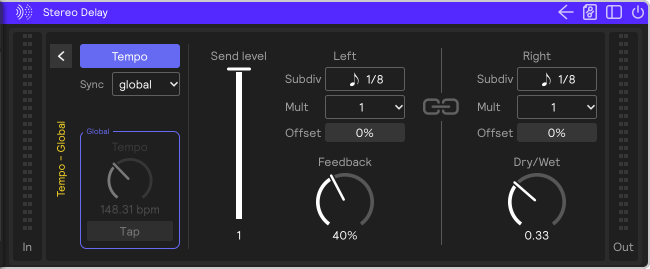
The arrow at the left edge of the effect opens the tempo panel. The label beside the arrow shows the current state, for example Tempo - Global, or Tempo - OFF in Time mode, so you can leave the panel folded and still see how the delay is set.
| Control | What it does |
|---|---|
| Tempo | The button at the top of the panel. When it's lit, the delay is in Tempo mode (delay from a tempo and a note value); when it's off, it's in Time mode (delay in milliseconds) and the rest of the panel is greyed out. |
| Sync | Where the tempo comes from: global (the session tempo), local (the Tempo control below), or midi (an external MIDI clock, chosen under Bus; in the plugin, host follows your DAW). |
| Tempo / Tap | The tempo (BPM) the delay times are based on. Tap to set it by ear. With global or midi sync, the clock sets the tempo, so these are greyed out and outlined and taps are ignored. |
Tempo mode
In Tempo mode, each channel's delay time is replaced by three controls, in a Left and a Right column:
| Control | What it does |
|---|---|
| Subdiv | The note value of one step of that channel's delay, e.g. 1/8 or 1/8 triplet. |
| Mult | How many of those steps make up the delay time. 2 × 1/8 is a quarter note. |
| Offset | Shortens or lengthens that channel's delay time by up to ±33%, for slightly pushed or dragged repeats, or a swung feel. |
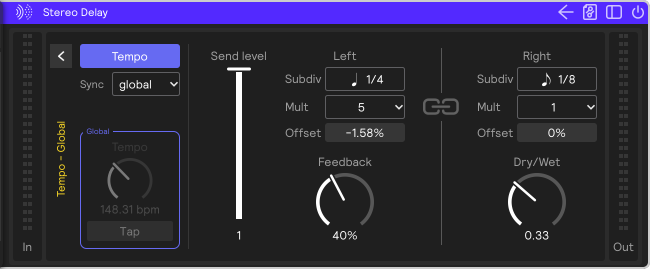
For a wide stereo spread, turn Link off and set the two channels to different note values, like 1/8 on one side and 1/8 triplet or dotted 1/8 on the other. Use a small Offset on one channel to loosen up the repeats.