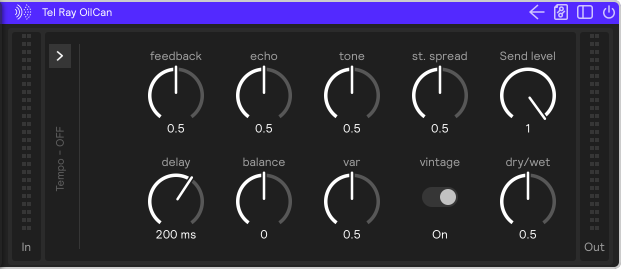
Modeled Delays
Sensory Percussion V2 has five modeled delay effects based on vintage tape, oil-can, and bucket-brigade echo units. They share the parameters below, and each one adds two character controls of its own (see The delays). The echo time is set either in milliseconds (Time mode) or synced to the session tempo as a note value (Tempo mode).
Common parameters
Delay
Sets the space between the echoes, from 5 to 2,000 ms. In Tempo mode this is replaced by note values; see Tempo mode.
Feedback
Controls how many times the echoes will repeat. A higher percentage means more echoes.
Echo
Controls the volume of each echo (but not the initial sound).
Balance
Sets the midpoint of the echoes. More to the left, and the echoes will center on the left side of the stereo image; more to the right and the effect will be centered on the right side.
St. Spread
Stereo spread: increase it to widen the left/right range of the echoes.
Vintage
Adds the filtering and character of the original analog hardware.
Dry / Wet
Controls how much of the effect you hear. Turning it all the way to the left will result in a completely dry, unprocessed signal. Turning it to the right will result in a completely wet signal.
Send Level
Sets the level of the signal sent into the echo.
Tempo panel
The arrow at the left edge of the effect opens the tempo panel. The label beside the arrow shows the current state, for example Tempo - Global, or Tempo - OFF in Time mode, so you can leave the panel folded and still see how the delay is set.
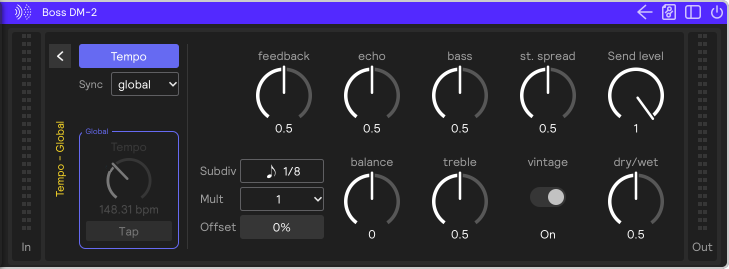
| Control | What it does |
|---|---|
| Tempo | The button at the top of the panel. When it's lit, the delay is in Tempo mode (delay from a tempo and a note value); when it's off, it's in Time mode (delay in milliseconds) and the rest of the panel is greyed out. |
| Sync | Where the tempo comes from: global (the session tempo), local (the Tempo control below), or midi (an external MIDI clock, chosen under Bus; in the plugin, host follows your DAW). |
| Tempo / Tap | The tempo (BPM) the echo time is based on. Tap to set it by ear. With global or midi sync, the clock sets the tempo, so these are greyed out and outlined and taps are ignored. |
Tempo mode
In Tempo mode, the Delay knob is replaced by three controls:
| Control | What it does |
|---|---|
| Subdiv | The note value of one step of the echo, e.g. 1/8 or 1/8 triplet. |
| Mult | How many of those steps make up the echo time. 2 × 1/8 is a quarter note. |
| Offset | Shortens or lengthens the echo time by up to ±33%, for slightly pushed or dragged repeats, or a swung feel. |
The delays
Each delay has two character controls of its own:
| Delay | Controls |
|---|---|
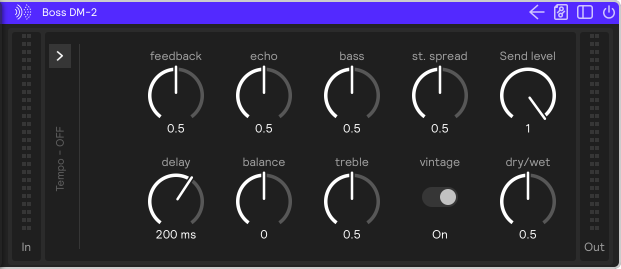
| Boss DM-2 | bass and treble: boost or cut the low and high frequencies of the echoes |
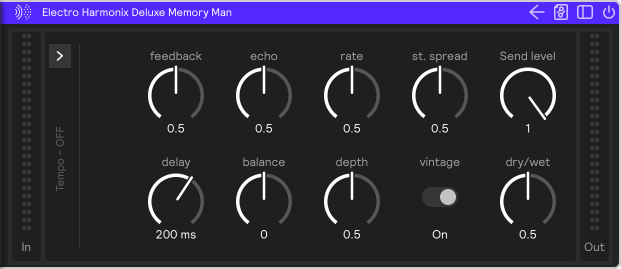
| Electro Harmonix Deluxe Memory Man | rate and depth: the speed and amount of modulation |
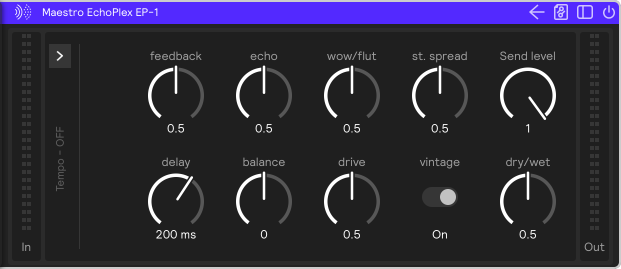
| Maestro EchoPlex EP-1 | wow/flut (tape wow and flutter) and drive (overdrive) |
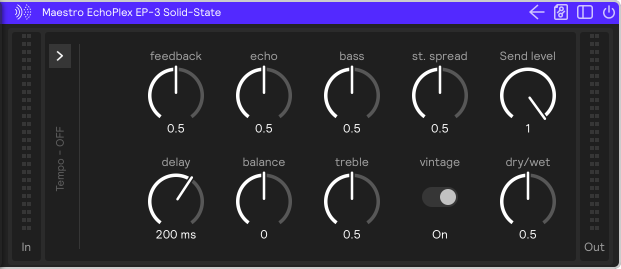
| Maestro EchoPlex EP-3 Solid-State | bass and treble: boost or cut the low and high frequencies of the echoes |
| Tel Ray OilCan | tone and var (variation) |
- Boss DM-2
- Electro Harmonix Deluxe Memory Man
- Maestro EchoPlex EP-1
- Maestro EchoPlex EP-3 Solid-State
- Tel Ray OilCan