Gate
The Gate passes the signal while it's louder than a threshold and turns it down once it falls below, so quiet passages, bleed, and hum between hits get pushed down or silenced entirely. It can also be keyed by another signal instead of its own input — gating a pad with the kick so the pad only sounds on the beat, for instance.
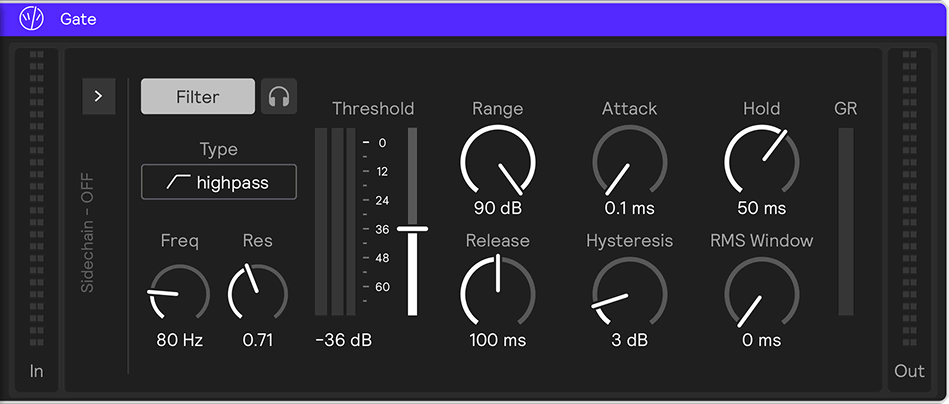
Parameters
Threshold
The level the signal must rise above for the gate to open, from −72 to +6 dB. Above it the gate passes the signal; below it the gate closes.
Range
How far the signal is attenuated while the gate is closed, from 0 to 90 dB. At 0 dB the gate does nothing; higher values silence the gap more completely.
Attack
How quickly the gate opens once the signal crosses the threshold, from 0.1 to 150 ms. A fast attack preserves transients; a slow attack fades the attack in.
Hold
The minimum time the gate stays open after the signal drops below the close point, up to 500 ms. This prevents chatter on signals that hover near the threshold.
Release
How quickly the gate closes after the hold time elapses, from 10 to 1000 ms. A slow release lets tails ring out; a fast release clamps them.
Hysteresis
The gap between the open and close thresholds, up to 24 dB. The gate opens at Threshold but doesn't close until the signal falls this far below it, which stops rapid open/close flutter.
RMS Window
The averaging time of the level detector, up to 100 ms. At 0 the detector follows peaks for a snappy response; higher values smooth it out for a steadier, less twitchy one.
Sidechain
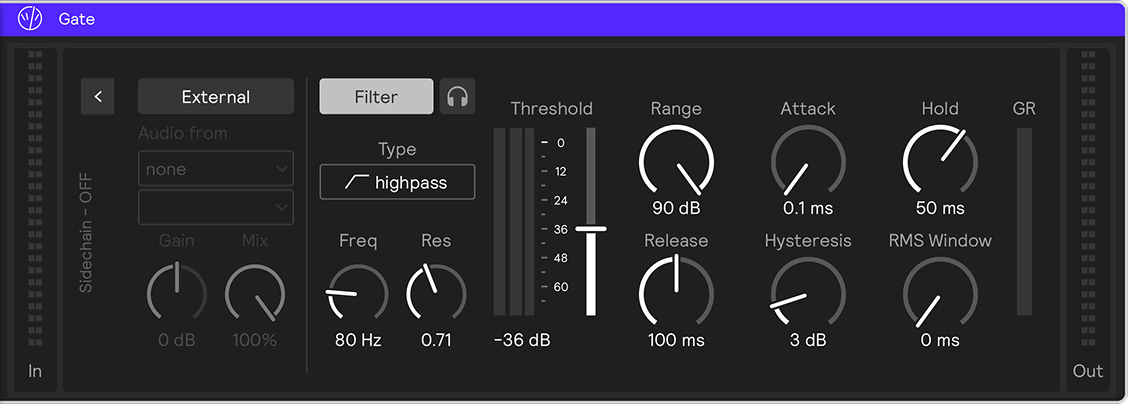
Switch on External in the sidechain panel to open the gate with a signal other than its own input. The panel provides the input and tap selectors along with the key gain and mix knobs, and is the same panel used by the Compressor.
Detector filter
A Filter (on by default, highpass at 80 Hz) and a headphone Listen button sit to the right of the sidechain panel and stay visible whether or not the panel is folded.
While sidechain is off, the filter keys on the gate's own input, so you can have the detector respond to specific frequencies — ignoring sub-bass, say — without routing an external source. Turning sidechain on always drops that internal filtering: the gate then keys off whatever's connected, filtered the same way once you choose a source, but hears nothing at all until you do.
Listen auditions whatever is driving the detector at any point along that chain.
Reading the meters
The wide meter to the left of the threshold slider shows the raw signal feeding the detector, and turns yellow when an external sidechain is driving it. The skinny bar beside it shows the detector level after the RMS window — that's the value actually compared against the threshold.