Convolution Reverb
The Convolution Reverb recreates the sound of a real acoustic space by running the incoming audio through an impulse response (IR) — a recording of how a room, hall, plate, or other space responds to a short burst of sound. The result is the natural reverb tail of that space applied to your signal.
It is a send effect: each source contributes to a shared reverb at its own send level, and the wet result is mixed back in.
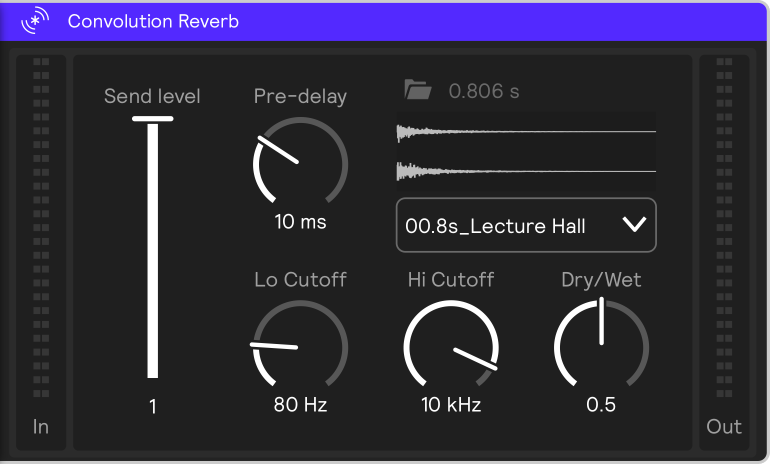
Parameters
Impulse Response (IR)
The IR is the heart of the effect — it defines the character and length of the reverb. You can load an IR three ways: pick one from the chooser, browse with Open file, or drag a .wav onto the effect.
Send Level
How much of the source is fed into the reverb (0–1).
Dry / Wet
Balance between the unprocessed (dry) signal and the reverb (wet), from fully dry to fully wet.
Pre-delay
The time between the source and the start of the reverb tail, in milliseconds.
Lo Cutoff
High-pass filter on the reverb (20 Hz–20 kHz). Raise it to thin out low-end rumble in the tail.
Hi Cutoff
Low-pass filter on the reverb (20 Hz–20 kHz). Lower it to darken and soften the tail.
The Lo Cutoff and Hi Cutoff filters shape the tone of the reverb tail only; together they set the band the reverb occupies.