How To Play Drum Software with a MIDI Kit
A MIDI Kit turns your whole kit into MIDI notes for drum software. Sensory Percussion comes with ready-made MIDI kits for popular drum software, so in most cases you only need to pick one and route the MIDI.
Factory MIDI kits are included for:
- Superior Drummer 3
- Addictive Drums 2
- Steven Slate Drums 5.5
- DW Soundworks
- Logic Drum Designer
- Ableton Drum Rack
- General MIDI (for anything that follows the standard GM drum map)
1. Set up a virtual MIDI port
If the drum software runs on the same computer, you need a virtual MIDI port to carry notes from Sensory Percussion to it. On a Mac, that's an IAC Driver bus; on Windows, a virtual port from a tool like loopMIDI. See How to Set Up MIDI Routing.
Then enable that port as an output in Settings → MIDI Devices.
2. Add a MIDI Kit
- In the Edit view, click + Add Module on an empty layer.
- Choose Instruments → MIDI kit and pick the kit for your drum software.
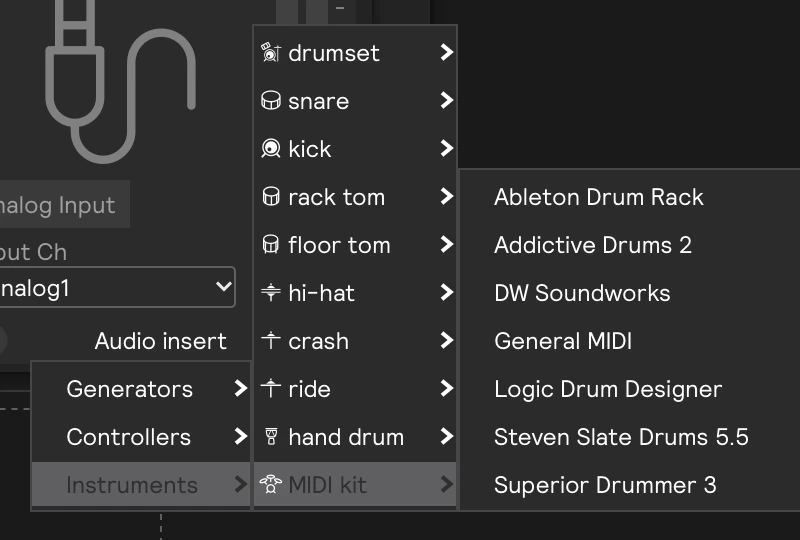
The kit maps each of your drums to the notes your drum software expects. If your session doesn't have a MIDI output yet, adding the kit creates one on MIDI 1 for you.
3. Route the MIDI
- Open the hardware panel and find the MIDI output for the kit (MIDI 1, unless you changed the kit's output).
- Set its Output Device to the virtual port from step 1.
- In your drum software, choose the same port as its MIDI input.
That's it: hit a drum and the drum software should play.
Superior Drummer 3: one-time setup
The Superior Drummer 3 kit maps kick, snare, rack and floor toms, hi-hat, ride, and crashes. Cymbal chokes are sent as aftertouch, which SD3 understands with no extra setup, and the hi-hat sends the pedal position on CC 4, so openness follows your foot continuously.
In Superior Drummer 3:
- Open Settings → MIDI In/E-Drums, and choose a Roland preset (for example TD-50), then Use Preset.
- Make sure the hi-hat pedal CC is set to 4.
- Select your virtual MIDI port as SD3's MIDI input.
The Roland preset also turns on positional sensing on CC 16, which the snare uses to play hits where they actually landed on the head, from center to edge.
Making it your own
A factory kit is an ordinary MIDI Kit, so you can change any drum, note, choke, or pedal setting. See MIDI Kit for every control.
When it's set up the way you like, open the kit's preset menu and choose Instruments → Save current as instrument…. Your kit then shows up next to the factory ones in + Add Module → Instruments → MIDI kit.
If your instrument has separate notes for open and closed hi-hat instead of a pedal input, set each hi-hat note's Pedal to open or closed. See Open and closed notes.